


2027 entry guide
New York Festivals TV & Film Awards honors the exceptional and innovative content being created today on all continents and seen across all platforms. We respect the achievements of the many talented men and women who make up the worldwide creative community. You take your work seriously, and so do we.
Enter your work into the competition
Click here for FAQ
If you need additional assistance or have any questions about our categories, please contact Processing at processing@newyorkfestivals.com You can also call us at 212-271-5278.
Rose Anderson
Executive Vice President, New York Festivals
randerson@newyorkfestivals.com.
Gayle Seminara-Mandel
SVP Communications, New York Festivals

RULES & REGULATIONS
-
The 2027 competition deadline is December 31, 2025.
ENTRY FEES
SINGLE – $445 USD
SERIES – $795 USD
STUDENT – $200 USDA separate fee is applicable for each category selection. If you are submitting more than one entry, send only one payment for the total amount of all your entry fees. We accept credit card payment using VISA, MasterCard, and AMEX. Credit Card Fees are 3% of total order for VISA and MasterCard. Credit Card Fees are 3.2% of total order for AMEX. Currency must be in USA dollars made payable to INTERNATIONAL AWARDS GROUP, LLC.
INTERNATIONAL AWARDS GROUP must receive payment information within 7 business days following the completion of your online entry submission in order to process entries, otherwise the entries may be withdrawn from the competition.
PROCESSING FEES
For wire (or bank) transfer payments, all bank charges must be prepaid by you and an additional $150 US dollars will be added to the total amount on your invoice to cover intermediary bank fees. You must include your invoice number on your bank transfer Instruction forms so we can match your payments to your order. You must send the financial contact information for all wire transfers and any purchase order requests or tax information requirements along with your invoice to accounting@newyorkfestivals.comYour invoice number and our bank transfer information will be available to you just prior to checkout. You will be able to print your invoice for your accounting department so they can execute the transfer. If you have any questions about your invoice forward it to accounting@newyorkfestivals.com.
Do not reply to invoice@newyorkfestivals.com
We do not charge media handling fees, sales tax, or VAT taxes.
LATE ENTRY FEE
Any entry submitted after the official Final Deadline may be subject to a 10% Late Entry Processing Fee.
REFUND POLICY
Refunds of entry fees will only be granted if a written request is made within 14 days of submitting entries and then a $100 fee per entry will be charged to cover additional administrative costs. After 14 days, because entries will have been processed and entered into the system, no refunds will be granted but we will be able to block the entries from the judging schedule.No refunds will be made once the judging begins.
-
To be eligible for the 2027 competition, entries must have been produced, released, exhibited, screened, aired, published or streamed from September 1, 2025, until the deadline of December 31, 2026, and were not awarded a trophy in the same category in the 2026 TV & Film Awards.
SINGLE ENTRY
An individual episode or “one-off”
2 File Maximum
1 Episode/piece and one supplemental information file
SERIES ENTRY
A program series or campaign
4 File Maximum
3 Episodes/pieces and one supplemental information file -
Select the category that most closely relates to your submission’s type of program, primary purpose, content, or target audience. You may enter the same production or program in multiple categories, including program categories and craft categories. There is an entry fee for each category you enter. Categories have Single entry and Series entry options depending on the number of pieces/episodes you submit.
The categories for Television & Film are divided into fourteen category groups. They are:
NEWS PROGRAM
NEWS REPORT/FEATURE
SPORTS PROGRAM
DOCUMENTARY
ENTERTAINMENT PROGRAM
ENTERTAINMENT SPECIAL
CRAFT PROGRAM
PROMOTIONS/OPEN & ID
CRAFT PROMOTION/OPEN & ID
STREAMING
STUDENT
FILMS
CORPORATE IMAGE
CRAFT FILMS/PRODUCTIONS
Submissions may be either full episodes or excerpts. All entries may submit a supplemental information file in the form of trailer or title sequence, URL or JPG.A performer/on-air personality may enter multiple achievements in a performance category if the achievements are for different programs constituting a body of work. Craft category submissions may enter multiple achievements constituting a body of work.
-
Individual entries are evaluated for their intrinsic merits – without comparing them with others. There is no numerical limit for the number of finalists in any category. The number of entries in a category has no bearing on how each entry is scored by the jury. One, none, or more than one award may be given in any category. Each entry is, in effect, in competition with itself, and is measured by our international award-winning jury of experts using an industry-accepted standard of excellence.
-
BROADCASTER OF THE YEAR
Will be awarded to the network with the highest scores for entries and largest medal count across all categories whether submitted by the network or the producer.PRODUCTION COMPANY OF THE YEAR
Will be awarded to the production company with the highest scores for entries and largest medal count across all categories.PROGRAM PROMOTION TEAM OF THE YEAR
Will be awarded to the creative team with the highest scores for entries and largest medal count across all promotion categories and all platforms regardless of who submitted the entry. -
The Shortlist will be announced in advance of the gala. The Grand, Gold, Silver, Bronze, and Finalist Diploma winners will be announced at the 2027 Storytellers Gala in May. Laurels will be sent to winning contacts three days before the awards ceremony. Student winners will be sent Diplomas. The Specialty Awards and Industry Awards of Broadcaster of the Year, Production Company of the Year, and Program Promotion Team of the Year will be announced at that time. Press releases will be sent to international wire service outlets, to the trades, across our social media platforms. New York Festivals winners may refer in advertising and publicity to the fact that they are a New York Festivals winner.
-
Free streaming platform dedicated to the future of our planet WaterBear Network, has partnered with New York Festivals to create an exclusive award. The WaterBear Award will be awarded to the highest scoring documentary across the Climate Change & Sustainability, Environment & Ecology, and Nature & Wildlife categories. The winner will be announced during the 2027 Storytellers Gala in May.
-
Formed to promote justice through the arts and public engagement, JusticeAid has partnered with New York Festivals to create an exclusive new award. The JusticeAid Award will be awarded to the highest scoring submission across all Social Justice categories in the NYF TV & Film and Radio competitions. The winner will be announced during the 2027 Storytellers Gala in May.
-
REQUIRED FIELD
The written background summary is required during the online entry process. There is a maximum of 800 words. Please include the purpose of your entry, the audience for your entry and any other pertinent information about content and context. This is your opportunity to address the grand jury members and explain what is special about your submission. You may submit a case study with a supplementary file for titles, trailer, JPEGs of performers, url, or press.Innovation entries may add a non-broadcast support video separated with a slate with background material for evaluation by the jury.
Technical Production Team entries may add a non-broadcast support video separated with a slate on the complexity of the production for evaluation by the jury
Use of Technology entries may add a non-broadcast support video separated with a slate on the complexity of the production for evaluation by the jury.
-
REQUIRED IF NOT IN ENGLISH
Productions not produced in the English language must have either subtitles or overdubbing in English or include a translation in English of the first and last 10 minutes of the entry. That translation must be submitted digitally in the translation box provided in the online entry form. Translations may only be edited after the entry process is complete by contacting NYF Processing. -
When submitting your credits, be aware that if your entry is a trophy winner, your Tower trophy will list only the year of the competition, the name of the entering company, name of the network/brand (if any), the title of the entry, and name of the category. One complimentary award (Tower or Diploma) will be sent to each winner. The Winners Gallery on our website can feature up to twenty names and corresponding job titles. Customized Diplomas with up to ten names and titles will be available for purchase through our store following the Storytellers Gala.
Finalist Diploma winners will receive a Diploma listing the year of the competition, the name of the entering company, name of the brand/network/platform, the title of the entry, name of the category, and ten names with corresponding job titles. All Student winners will receive a Diploma.
Shortlisted entries when notified will be given the opportunity to update and correct credits and shipping addresses. However, if no corrections are made, credits and shipping information listed during the entry process will be considered the credits of record. Requests for credit changes after the official winners announcement can be charged a $100 fee per entry to cover additional administrative costs.
New York Festivals will send one award for each winning entry only once. Winning trophies will be shipped to the entering contact shipping address only. Any return and re-shipping costs will be paid for by the entrant.
Following the gala, you may purchase personalized trophies for the individuals involved in the creation of the work via our eStore. Any shipping costs and customs duties are paid by the winning entrant.
-
All entries must use the following standards for text formatting. These standards allow us to better judge and showcase your work.
TITLE OF ENTRY FORMAT
Proper Case (all first letters capitalized) must be used in the title and brand name. Do not use all capital or all lower-case letters. Do not enclose the entry title in quotes or angle brackets. (< >)
PERFORMANCE CATEGORIES
include the name of the performer followed by the title of the program.EXAMPLE
Actor First and Last Name, Program TitleThe character limit for Entry Titles is 40 characters including spaces.
Series entries must be named with a single series title or with individual program titles separated by slashes.
SINGLE ENTRY EXAMPLE
Title Of EntrySERIES EXAMPLE
Title One / Title TwoSERIES EXAMPLE WITH OVERALL TITLE
Series Title of Entry
TRANSLATION & BACKGROUND SUMMARY
Include text in Sentence Case (first letter of each sentence capitalized). Do not use all capital or all lowercase letters.Please do not use quote marks or angle brackets or parenthetical marks of any kind within the translation or summary—this will give an error message and you will not be able to complete your submission.
EXAMPLE
This entry is a children’s program. It is targeted toward ages 8 to 14.BRANDS AND CO-PRODUCTIONS
The character limit for Brands and Co-productions is 40 characters including spaces. Please separate partners with slashes.CREDITS
Please list individual credits in order of importance with the highest credit first. Production and Talent names and job titles must be in Proper Case (all first letters capitalized). Do not use all capital or all lower-case letters. There is a separate field for each name and each title. The character limit for each line of Credits is 80 characters including spaces. -
DELIVERY REQUIREMENTS OVERVIEW
New York Festivals displays your entries in an encoded format to our online Grand Jury to judge. Access is password protected. Judges have commented that Time Code or watermarks are distracting so we ask that you submit the streamed/on-air/final version of your entry.All entries can be uploaded through our online entry process. We no longer use FTP as a means of delivery. We no longer accept entries on tape-based media. We accept only QuickTime (.mov) files. We recommend that all entries be uploaded. All uploaded videos must use H.264 compression and have a QuickTime (.mov) or (.mp4) wrapper.
Once uploaded and cycled through our system, no other entrants can view your uploaded submissions. Once uploaded, even you cannot see your entry unless you wait 48 hours and use your invoice link to preview your entry.
If your entry is within a url, we suggest you send your video as a QuickTime (.mov) file. If you use vimeo, you must select the download option.
Remember, if you are submitting a series entry, each piece must be uploaded separately.
If you wish, you may request a dropbox link for your convenience.
If you have additional questions, please contact our Processing and IT departments at processing@newyorkfestivals.com
GLOSSARY OF TERMS
In order to assist you in the upload process, we have compiled a glossary of formatting terms.FTP (FILE TRANSFER PROTOCOL)
A standard for transferring files from one computer to another over the internet.COMPRESSION
Reduces the size of your file.BIT RATE
The amount of data used for each second of video. It controls visual quality and file size. Also known as data rate.FRAME RATE
Most videos are shot between 24 – 60 frames per second.FRAME SIZE/CANVAS/RESOLUTION
The dimension in pixels of the compressed file.CODEC/ENCODING
H.264 is the only codec we accept.WRAPPER
The file type/extension. Example: .mov; .mp4; .wmv. We accept QuickTime files (.mov) and (.mp4).
ENTRY TECHNICAL GUIDELINESBARS & TONE/SLATES
Do not use Bars & Tone. Do not use a countdown. Entries may not be divided into chapters. Entries may use a single title graphic (slate) to identify the entry, if desired. Please note on your slate whether your entry is 16x9 or 4x3. Use 16 x 9 full frame, not anamorphic. Micro-dramas and verticals use native format.TECHNICAL SPECIFICATIONS PROGRAM LENGTH UNDER 1HR
Format: 1920x1080 (16:9) H.264
Progressive scan (23.98) preferred
Video Encode: CBR (Constant Bite Rate) 10Mbps
Audio Encode: AAC 320 kbps, 48KHz
Aspect: Square Pixels (1.0)TECHNICAL SPECIFICATIONS PROGRAM LENGTH OVER 1HR
Format: 1920x1080 (16:9) H.264 Progressive scan (23.98) preferred
Video Encode: CBR (Constant Bite Rate) 7Mbps
Audio Encode: AAC 320 kbps, 48KHz
Aspect: Square Pixels (1.0)FOR SD FILES
Use the H.264 at Main Level compression profile.FOR HD FILES
Use the H.264 at High-Level compression profile.HOW TO UPLOAD YOUR ENTRIES
After you receive your confirmation email for your closed cart, you will need to input the piece details including title, entry format, background summary, and translation (if not in English). Then you will be able to upload your entries by clicking the upload box next to each entry. Please make sure that you upload (attach) all pieces of your entries.Series entries may consist of up to three pieces (either complete episodes or segments) that best represent the entire series. If your series entry has three pieces, you will have three files to upload. Please upload them in the order you wish the judges to view them.
All entries can upload a supplemental information piece to accompany the submission.
Please see “How to enter” for Confirmation Number and Piece Details.
IF YOUR ENTRIES ARE URL/LINKS
If you use this option, we recommend that you follow the file size and formats above. You must keep the links active through the entire process and we will need .mov or .mp4 files for the ceremony and winners showcase.ENTRIES SUBMITTED BY POST OR BY COURIER
We no longer accept this form of delivery. It is costly for entrants. Entrants must upload their submissions. Uploading gives entrants maximum control over their submissions and ensures better quality for the jury’s evaluation. If you are unable to upload, please contact processing for additional assistance. -
DELIVERY REQUIREMENTS OVERVIEW
Entries and materials submitted will not be returned and may be displayed, shown, duplicated, published, or reproduced for educational and/or promotional purposes as New York Festivals® deems appropriate. By entering, the entrant agrees to hold New York Festivals® and any of its affiliated companies exempt from any costs or expenses of any claim arising out of any such use.Entrants have the option to not have their entry shown in its entirety on our websites by exercising the option listed on the online entry form. Entrants who exercise that option may upload trailers once judging has concluded if they desire to showcase their winning entries.
New York Festivals® assumes no responsibility for the acts or omissions of those individuals or entities submitting entries pursuant to this notice. By entering, entrants guarantee they have obtained the permission of the rights-holder for any submission.
All submitting entities and/or individuals are advised to review submissions with respect to correct name credits and other information.
CATEGORIES
-
Entries in this category group, News Program, are either regularly scheduled series or specials that are journalism-based and include on-air categories for Anchors, Reporters and Correspondents. There is a category for Best Interview. A body of work from different programs is allowed for on-air personality categories.
A01 BREAKING NEWS COVERAGEA02 CONTINUING NEWS COVERAGE
A03 INTERVIEW
A04 INVESTIGATIVE NEWS COVERAGE
A05 NEWS ANALYSIS/COMMENTARY
A06 NEWS ANCHOR
A07 NEWS DOCUMENTARY/SPECIAL
A08 NEWS REPORTER/CORRESPONDENT
A09 NEWS TALK SHOW
A10 NEWSCAST
A11 NONFICTION SERIES
A12 PUBLIC AFFAIRS PROGRAM
A13 SOCIAL JUSTICE COVERAGE
-
Entries in this category group, News Report/Feature, are for journalism-based submissions which have a duration shorter than a full program.
B01 BREAKING NEWS STORY COVERAGEB02 CONTINUING NEWS STORY COVERAGE
B03 EDITORIAL/VIEWPOINT FEATURE
B04 FINANCIAL NEWS REPORT
B05 HEROES FEATURE
B06 HUMAN INTEREST FEATURE
B07 INVESTIGATIVE REPORT
B08 LEGAL NEWS REPORT
B09 MAGAZINE FEATURE
B10 SOCIAL JUSTICE REPORTING
B11 SPECIAL REPORT
-
Entries in this category group, Sports Program, are either regularly scheduled series or specials that are journalism-based. They include on-air categories for Anchors, Analysts, Reporters and Correspondents. A body of work from different programs is allowed for on-air personality categories. Reports/Features are for journalism-based submissions which have a duration shorter than a full program.
C01 SPORTS ANCHOR/ANALYST
C02 SPORTS ANTHOLOGY
C03 SPORTS COVERAGE
C04 SPORTS DOCUMENTARYC05 SPORTS ENTERTAINMENT
C06 SPORTS FEATURE
C07 SPORTS JOURNALISM
C08 SPORTS REPORTER/CORRESPONDENT
C09 SPORTS SOCIAL JUSTICE COVERAGE
C10 SPORTS SPECIALC11 SPORTS STUDIO SHOW
-
Entries in this category group, Documentary, explore a specific topic or point of view in-depth, deal with issues of interest and importance and may be either individual programs or series. Curated and Episodic series may be entered in Nonfiction series.
D01 BIOGRAPHY/PROFILESD02 BUSINESS & FINANCE
D03 CLIMATE CHANGE & SUSTAINABILITY
D04 COMMUNITY PORTRAITS
D05 COMMUNITY SERVICE PROGRAMS
D06 CULTURAL ISSUES
D07 CURRENT AFFAIRS
D08 DOCUDRAMA
D09 ECO-TOURISM
D10 EDUCATIONAL/INSTRUCTIONAL
D11 ENVIRONMENT & ECOLOGY
D12 HEALTH/MEDICAL INFORMATION
D13 HEROES
D14 HISTORY & SOCIETY
D15 HUMAN CONCERNS
D16 HUMAN RIGHTS
D17 INTERNATIONAL AFFAIRS
D18 INVESTIGATIVE JOURNALISM
D19 LEGAL ISSUES
D20 MAGAZINE FORMAT
D21 MUSIC
D22 NATIONAL AFFAIRS
D23 NATURE & WILDLIFE
D24 NONFICTION SERIES
D25 POLITICS
D26 RELIGION & PHILOSOPHY
D27 SCIENCE & TECHNOLOGY
D28 SHORT FORM
D29 SOCIAL ISSUES
D30 SOCIAL JUSTICE
D31 THE ARTS
D32 TRAVEL & TOURISM
-
Entries in this category group, Entertainment Program, are series either live-action or animation and may be live or recorded. Variety programs may be adapted from other mediums. Reality TV drama may be structured or unstructured.
E01 ANIMATED PROGRAME02 ANTHOLOGY
E03 CHILDRENS/YOUTH
E04 COMEDY
E05 CRIME DRAMA
E06 CULINARY PROGRAM
E07 DRAMA
E08 EDUCATIONAL/INSTRUCTIONAL
E09 FAMILY PROGRAMS
E10 LIFESTYLE PROGRAM
E11 MICRO-DRAMA NEW
E11 MYSTERY
E12 PERFORMING ARTS
E13 REALITY TV DRAMA
E14 SCIFI/FANTASY/HORROR
E15 SOCIAL JUSTICE
E16 TALK/INTERVIEW
E17 VARIETY
-
Entries in this category group, Entertainment Special, are specials or series of pre-determined duration in a limited timeframe. They may be live-action or animation and may be live or recorded. Variety Specials may be adapted from other mediums. Awards, Parades, Telethons, Opening/Closing ceremonies, News or Political ceremonies may be entered in Special Event.
F01 ANTHOLOGYF02 CHILDRENS/YOUTH SPECIAL
F03 COMEDY/SATIRE SPECIAL
F04 DRAMA SPECIAL
F05 FAMILY SPECIAL
F06 MINI-SERIES
F07 PERFORMING ARTS SPECIAL
F08 REALITY TV DRAMA SPECIAL
F09 SOCIAL JUSTICE SPECIAL
F10 SPECIAL EVENT
F11 TALK/INTERVIEW SPECIAL
F12 TELENOVELAS
F13 TV MOVIE
F14 VARIETY SPECIAL
-
Entries in this category group, Craft Program, showcase a particular craft which contributes to the look, sound, or performance of the over-all production elements of the program. All genres of content are eligible for craft categories. Innovation, Use of Technology and Technical Production Team include a behind-the-scenes video. For Host, Performance by an Actor/Actress categories include the name of the performer in the entry title.
G01 ANIMATIONG02 CAMERAWORK
G03 DIRECTION
G04 EDITING
G05 GRAPHIC DESIGN
G06 HOST
G07 INNOVATION
G08 LIGHTING DESIGN/DIRECTION
G09 NARRATION
G10 ORIGINAL MUSIC/LYRICS
G11 PERFORMANCE BY AN ACTOR
G12 PERFORMANCE BY AN ACTRESS
G13 PRODUCTION DESIGN/ART DIRECTION
G14 SCREENPLAY
G15 SOUND DESIGN
G16 SPECIAL VISUAL EFFECTS
G17 TECHNICAL PRODUCTION TEAM
G18 WRITING
G19 USE OF TECHNOLOGY
-
Entries in this category group, Promotion/Open & ID, promote the image/brand of a station, network, website, program, or on-air talent. Categories include generic, episodic, and special tune-in announcements; program opens and main titles; and IDs.
H01 ANIMATED PROGRAM PROMOTION
H02 CHILDREN’S PROGRAM PROMOTION
H03 CONTEST/SPECIAL PROMOTION
H04 DOCUMENTARY OPEN & TITLES
H05 DOCUMENTARY PROGRAM PROMOTION
H06 ENTERTAINMENT PROGRAM OPEN & TITLES
H07 ENTERTAINMENT PROGRAM PROMOTION
H08 MULTI-PLATFORM PROMOTION
H09 NEWS PROGRAM OPEN & TITLES
H10 NEWS PROGRAM PROMOTION
H11 PROMOTIONAL PROGRAM
H12 SPORTS PROGRAM OPEN & TITLES
H13 SPORTS PROGRAM PROMOTION
H14 STATION/IMAGE PROMOTION
H15 STATION/NETWORK ID
H16 STREAMING PROMOTION
H17 SOCIAL JUSTICE PROMOTION
H18 TELENOVELA PROMOTION
-
Entries in this category group, Craft Promotion/Open & ID, showcase a particular craft which contributes to the look or sound of the over-all production elements of a promotion, open, or ID. Use of Technology include a behind-the-scenes video.
J01 ANIMATIONJ02 ART DIRECTION
J03 CAMERAWORK
J04 COPYWRITING
J05 DIRECTION
J06 EDITING
J07 GRAPHIC DESIGN
J08 LIGHTING DESIGN
J09 ORIGINAL MUSIC
J10 PRODUCTION DESIGN
J11 SOUND DESIGN
J12 SPECIAL VISUAL EFFECTS
J13 USE OF TECHNOLOGY
-
Entries in the category group, Streaming, were created for streaming and include all forms of news, entertainment, sports, documentary, image, and educational/informational content. Entries may be long form or short form. Verticals are eligible.
K01 STREAMING ANTHOLOGYK02 STREAMING ARTS & HUMANITIES
K03 STREAMING BRANDED ENTERTAINMENT
K04 STREAMING COMEDY
K05 STREAMING CRIME DRAMA
K06 STREAMING DOCUMENTARY
K07 STREAMING DRAMA
K08 STREAMING EDUCATIONAL
K09 STREAMING ENTERTAINMENT
K10 STREAMING NEWS
K11 STREAMING MUSIC VIDEO
K12 STREAMING REALITY TV DRAMA
K13 STREAMING SOCIAL JUSTICE
K14 STREAMING SPECIAL EVENT
K15 STREAMING SPORTS
-
Entries in this category group, Student, were created by students. Entries can include all genres and be feature length or short form.
L01 STUDENT FILML02 STUDENT SOCIAL JUSTICE CONTENT
-
Entries in the category group, Films, include all genres and may be submitted by Studios, Networks, Agencies, or Independent Production Companies.
M01 FEATURE DOCUMENTARIESM02 FEATURE FILMS
M03 SHORT FILMS
M04 VIDEO ART & EXPERIMENTAL FILM
-
Entries in this category group, Corporate Image, specialize in company identity, values, social issues, and messaging. They utilize innovative scripting, special effects, documentary storytelling techniques, or live presentation in their content and may be on topics of interest to specific or targeted audiences.
N01 ATTITUDINAL TRAININGN02 BRANDED CONTENT
N03 BRANDED DOCUMENTARY
N04 BRAND IMAGE
N05 CORPORATE SOCIAL RESPONSIBILITY
N06 CORPORATE SOCIAL RESPONSIBILITY NOT FOR PROFIT
N07 EVENT VENUE EXPERIENCE
N08 EMPLOYEE ENGAGEMENT
N09 PUBLIC RELATIONS & SOCIAL ENGAGEMENT
N10 SALES
N11 SOCIAL GOOD
N12 SOCIAL JUSTICE
N13 SUSTAINABLE DEVELOPMENT
N14 TOURISM
-
Entries in this category group, Craft Films/Productions, are theatrical or corporate content that showcase a particular craft which contributes to the look, sound, or performance of the over-all production elements of the film or production. All genres are eligible for craft categories. VR/360/AR/MR may be submitted in Use of Technology or Innovation. Innovation, Use of Technology and Technical Production Team include a behind-the-scenes video.
P01 ANIMATIONP02 CINEMATOGRAPHY
P03 DIRECTION
P04 EDITING
P05 GRAPHICS/TITLES
P06 INNOVATION
P07 NARRATION
P08 ORIGINAL MUSIC
P09 ORIGINAL SCREENPLAY
P10 PERFORMANCE BY AN ACTOR
P11 PERFORMANCE BY AN ACTRESS
P12 PRODUCTION DESIGN/ART DIRECTION
P13 SOUND DESIGN
P14 SPECIAL VISUAL EFFECTS
P15 TECHNICAL PRODUCTION TEAM
P16 USE OF TECHNOLOGY
P17 WRITING
entry process
SAMPLE ENTRY FORM
how to enter
Before you start submitting your entry, gather all the information you will need from your team. Base information includes details about your company and the title of your submission.
If you are a Student entry, you will need to select Student instead of Company.
We have created a checklist for you and sample entry form screen shots for a step-by-step look at the entire Entry Process from creating a new entry, assigning credits, selecting categories, payment, background summary and translation, to uploading your submission and confirmation of the upload.
ALL SUBMISSIONS ARE REVIEWED/QCED BEFORE JUDGING AND IF THERE ARE ANY ISSUES, INCLUDING CATEGORY SELECTION, WE WILL CONTACT YOU.
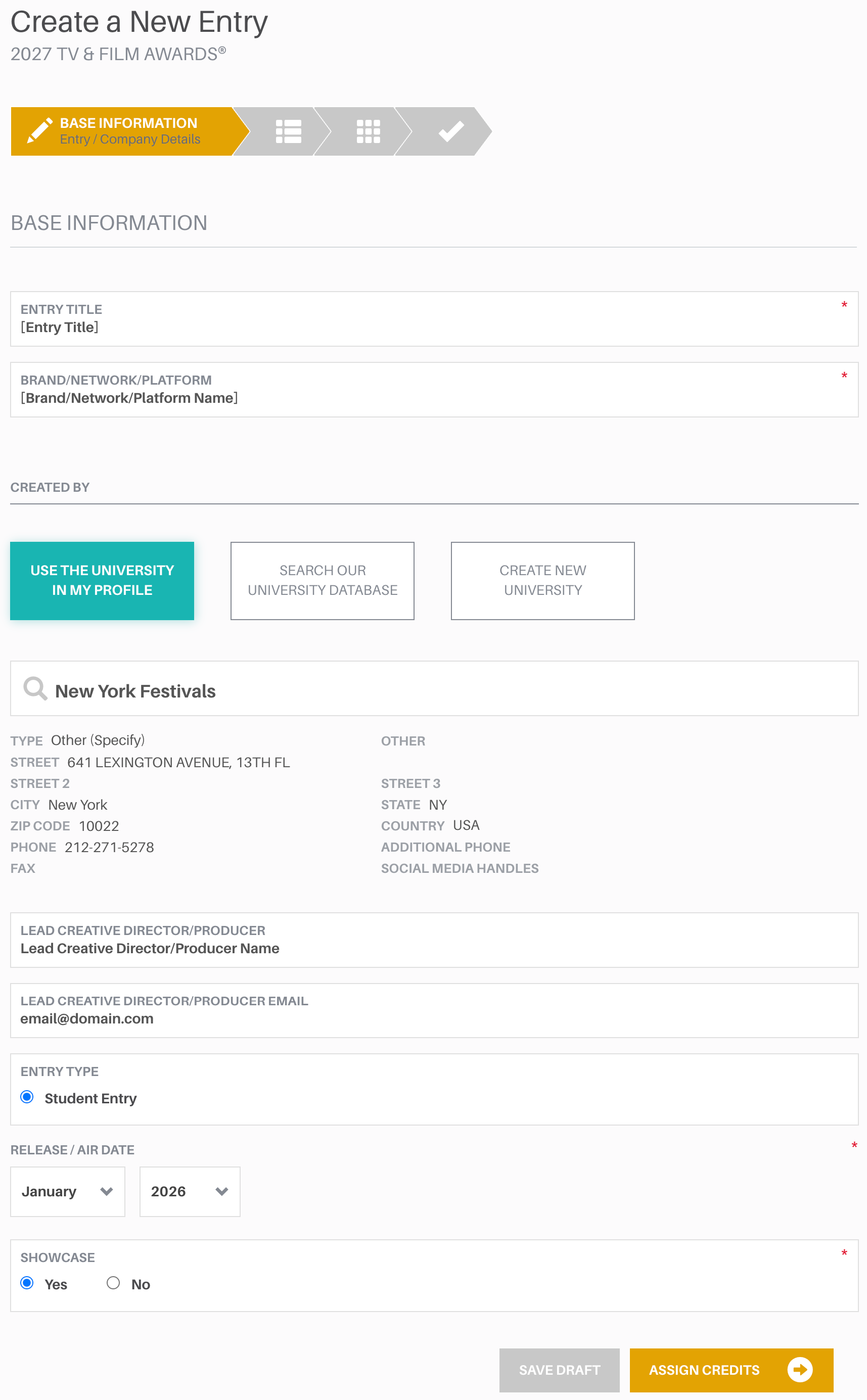
1. base information
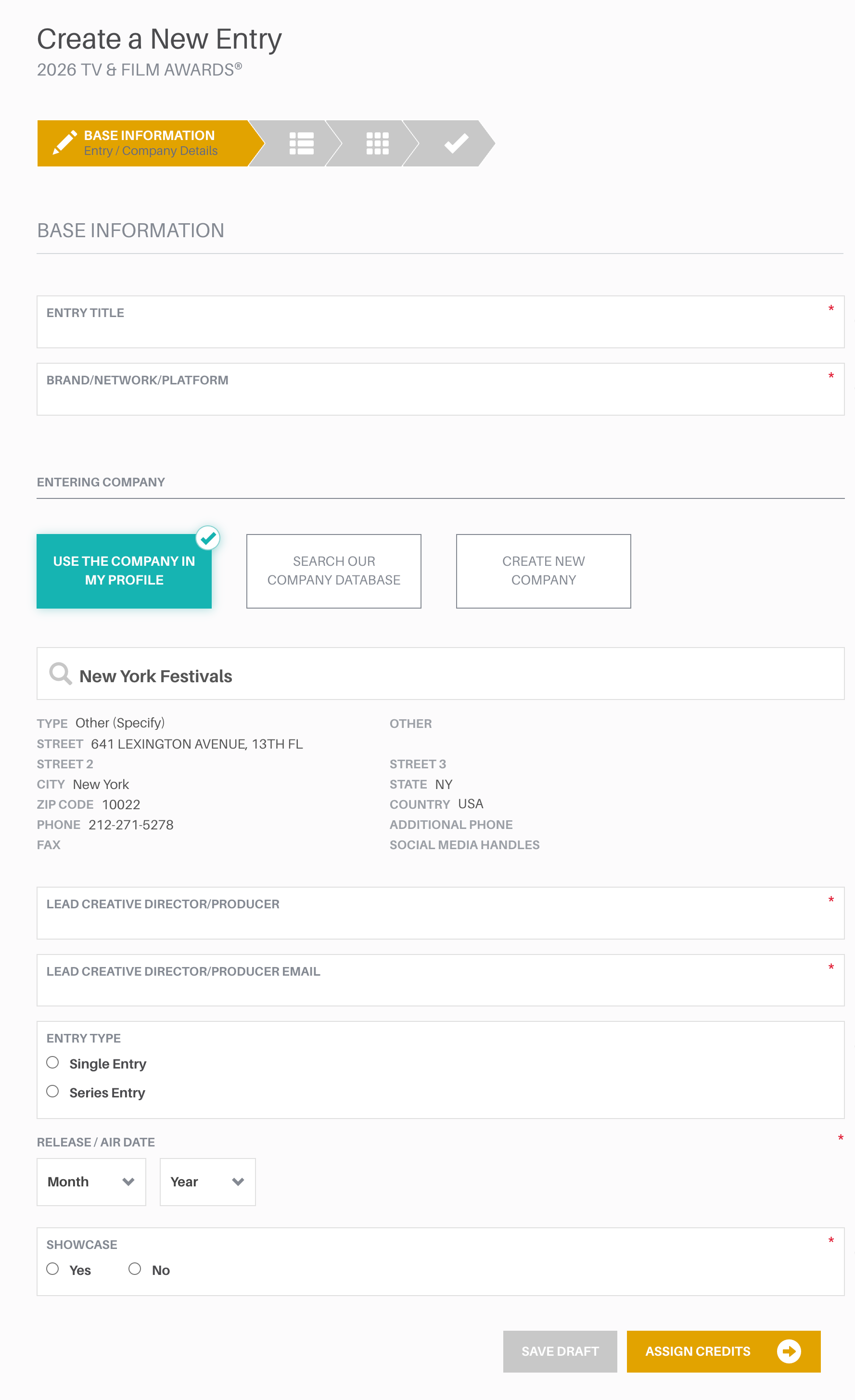
PLEASE PREPARE THE FOLLOWING INFORMATION
ENTRY TITLE
BRAND/NETWORK/PLATFORM
ENTERING COMPANY
LEAD CREATIVE DIRECTOR/PRODUCER
LEAD CREATIVE DIRECTOR/PRODUCER EMAIL
Please make sure that your Entry Title, Company, and Brand/Network/Platform name all contain proper spelling and correct capitalization. Winning entries will be showcased on our website exactly as they are entered.
ENTRY TYPE
See Text Specifications
See Eligibility & Entry Type for Single, Series
RELEASE/AIRDATE
Must be within Eligibility Window
SHOWCASE YES or NO
Winning entries will be shown in their entirety in our Winners Gallery. Select NO to opt out.
2. Assign credits
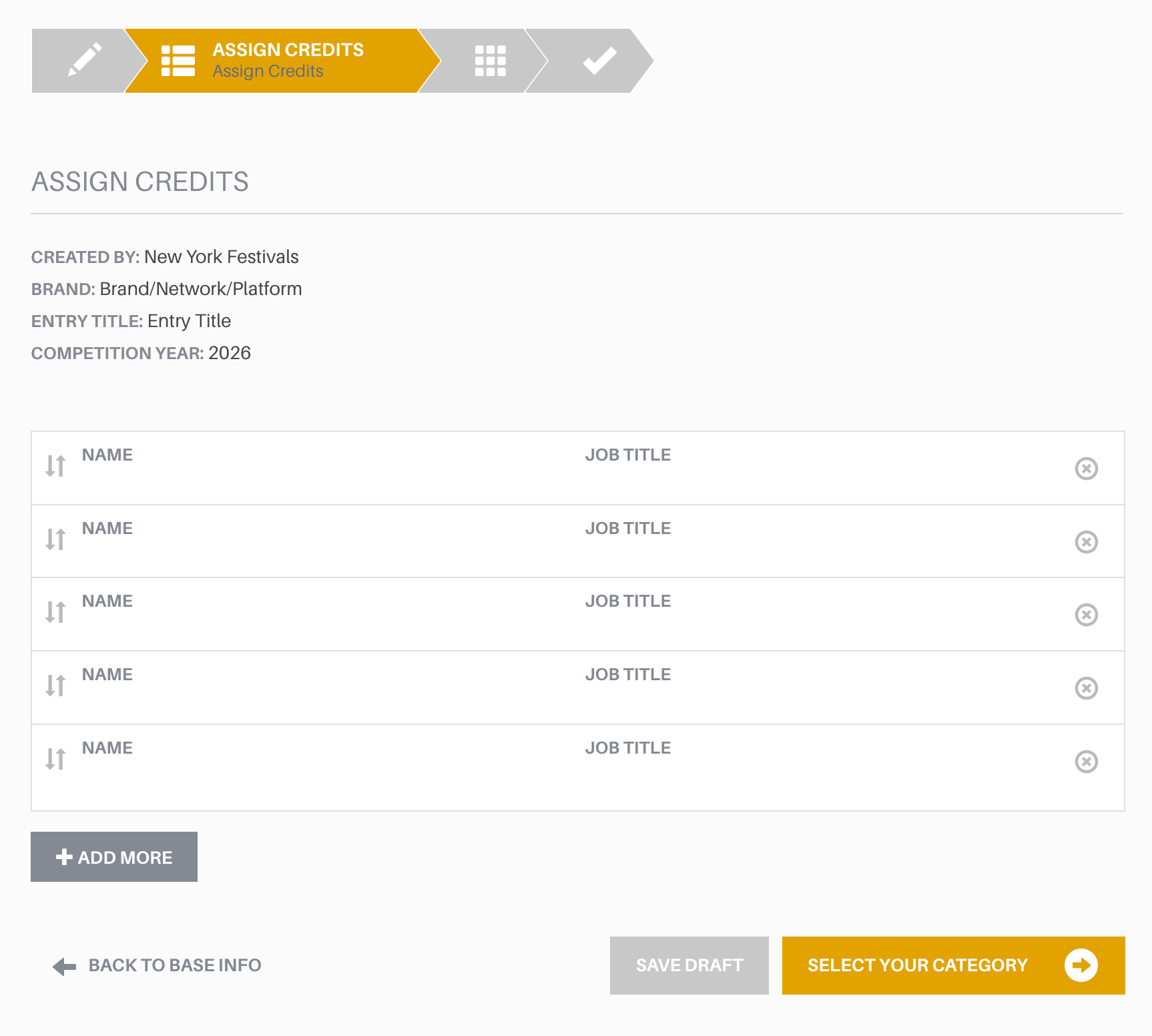
Please list individual credits in order of importance with the highest credit first. The character limit for each line of Credits is 80 characters including spaces.
Winning trophies will be shipped to the entering contact shipping address only. Any return and re-shipping costs will be paid for by the entrant.

3. Select Category
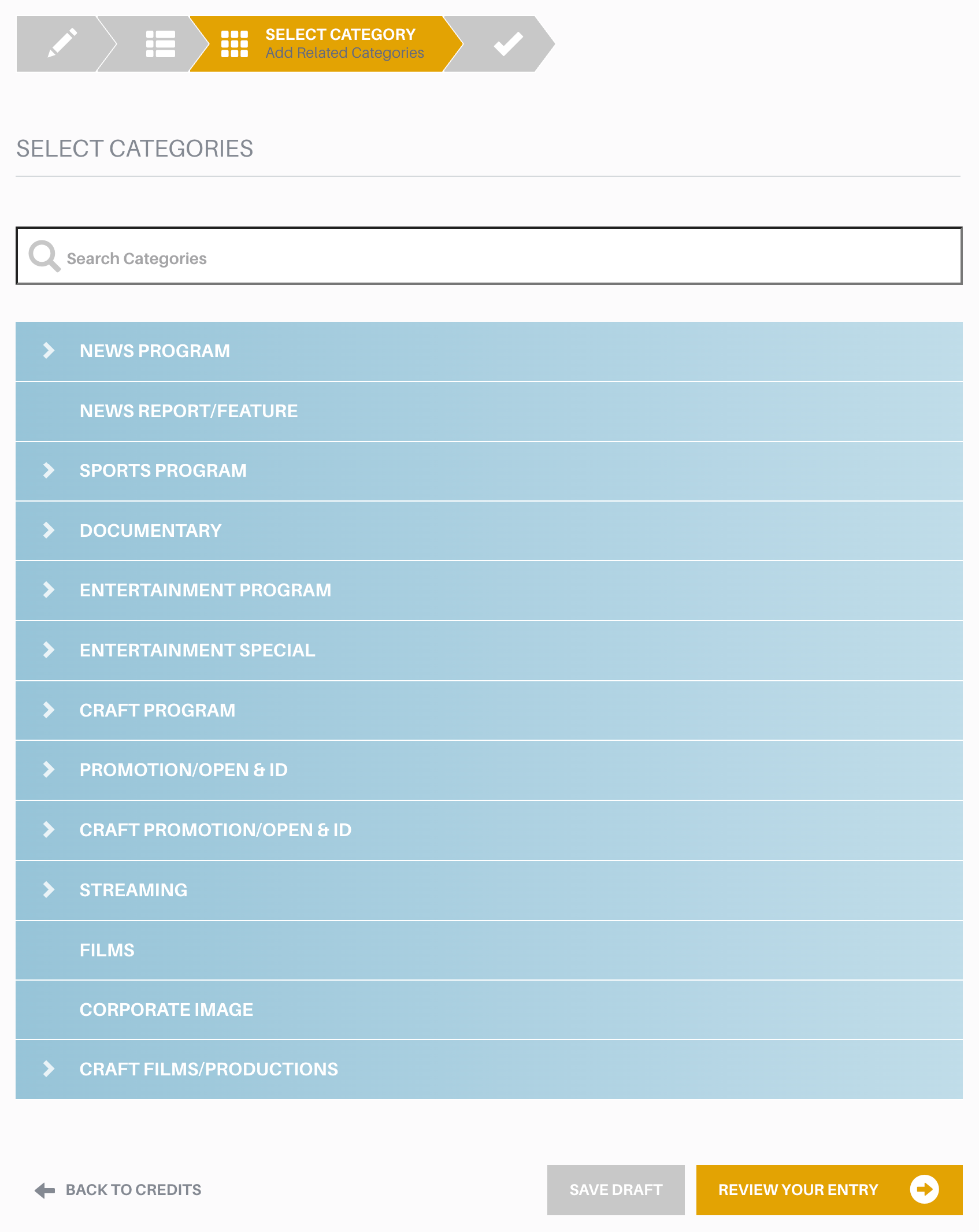
Select the category that most closely relates to your submission’s type of program, primary purpose, content, or target audience. You may enter the same production or program in multiple categories, including program categories and craft categories. If you are submitting the exact same material including credits into more than one category, our system will duplicate that entry across all the categories you select. There is an entry fee for each category you enter. Categories have Single entry and Series entry options.
If your entry is a copy, please keep only the new category you have selected. Please remove the word Copy in the entry title on the Base Information page.
4. review entry
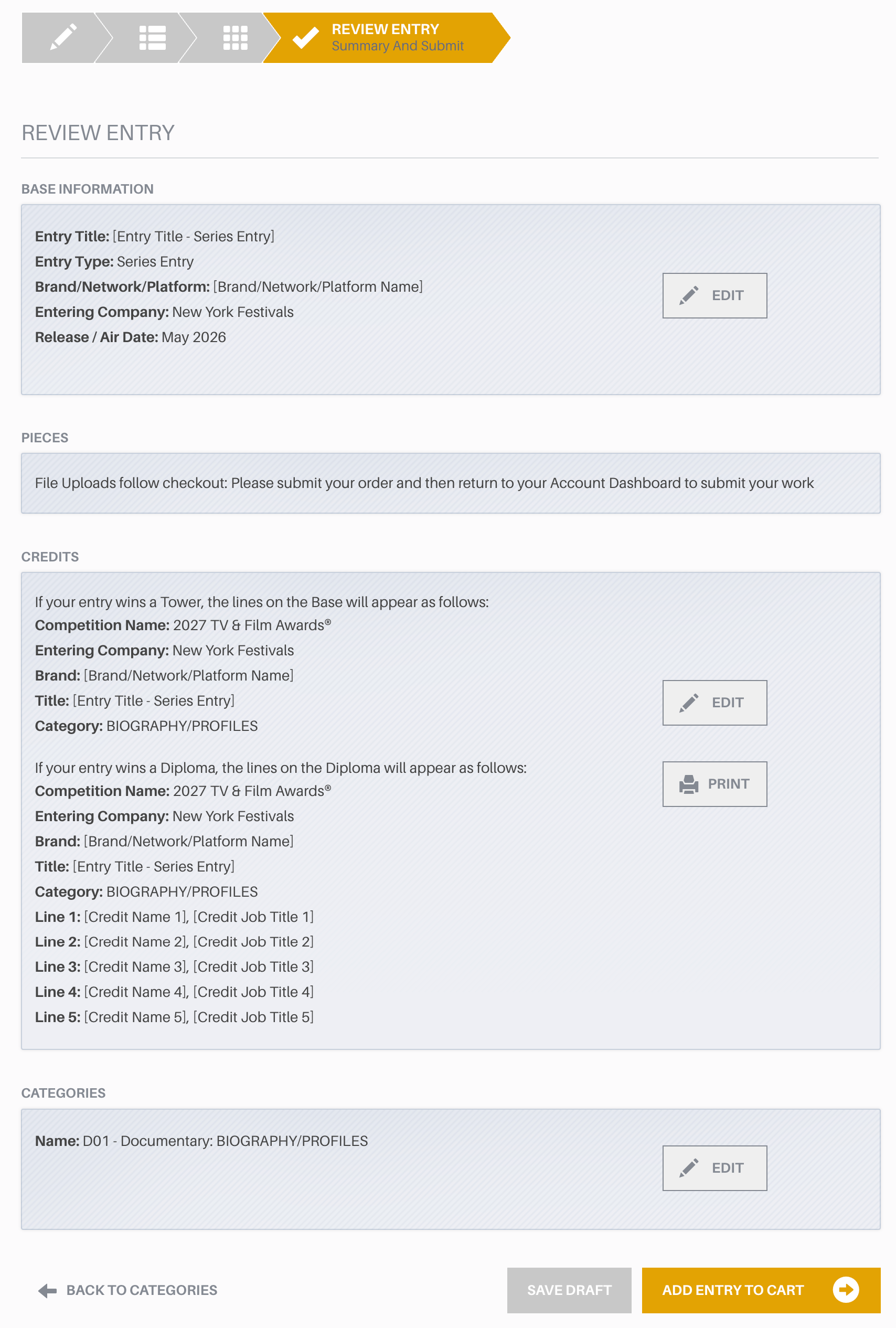
The “Review Entry” page summarizes your Base Information, Credits, and Categories. Please make sure these details are correct. When you are ready, click the “ADD ENTRY TO CART” button to continue. You can have multiple entries in any one cart if you wish.
You will be able to upload your submissions only after you close your cart and pay for your entries. After you receive your confirmation number, you will need to input the piece details including title, entry format, background summary, and translation (if not in English) before you upload each piece of each entry.
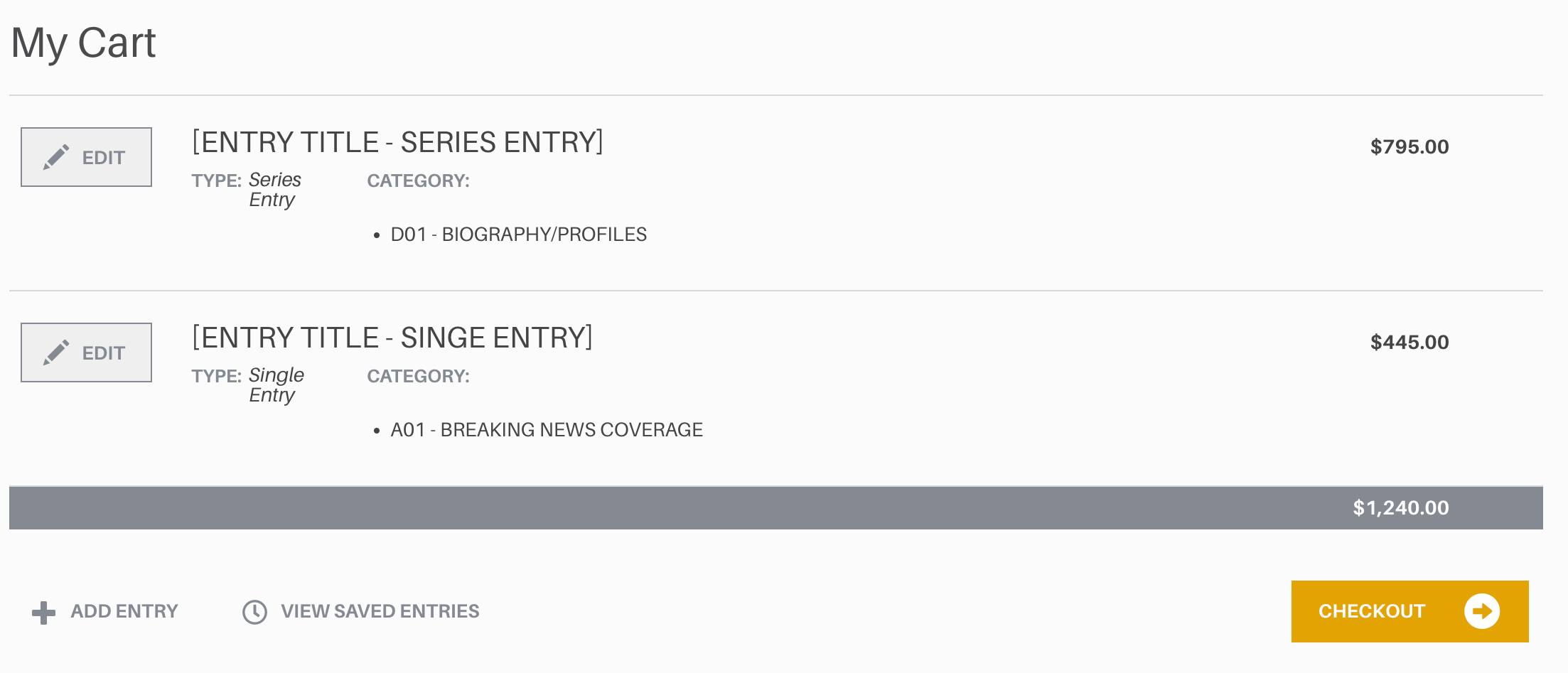
5. my Cart
Your cart will display any completed entry drafts that have been added to it.
If your cart is empty, please click “Enter” in the header to start a new entry, or return to your Account Dashboard to finish any incomplete drafts.
When you have added an entry to your cart, the following options will become available:
Once you have completed your entries, please delete any drafts in your cart as they will be displayed as an open cart in your account.
EDIT
Will allow you to return to your Entry Details.
SAVE FOR LATER
Will move your Entry Draft into the Completed Entries section of your Account Dashboard.
+ADD ENTRY
Will start a new entry.
CHECKOUT
Will proceed to payment.
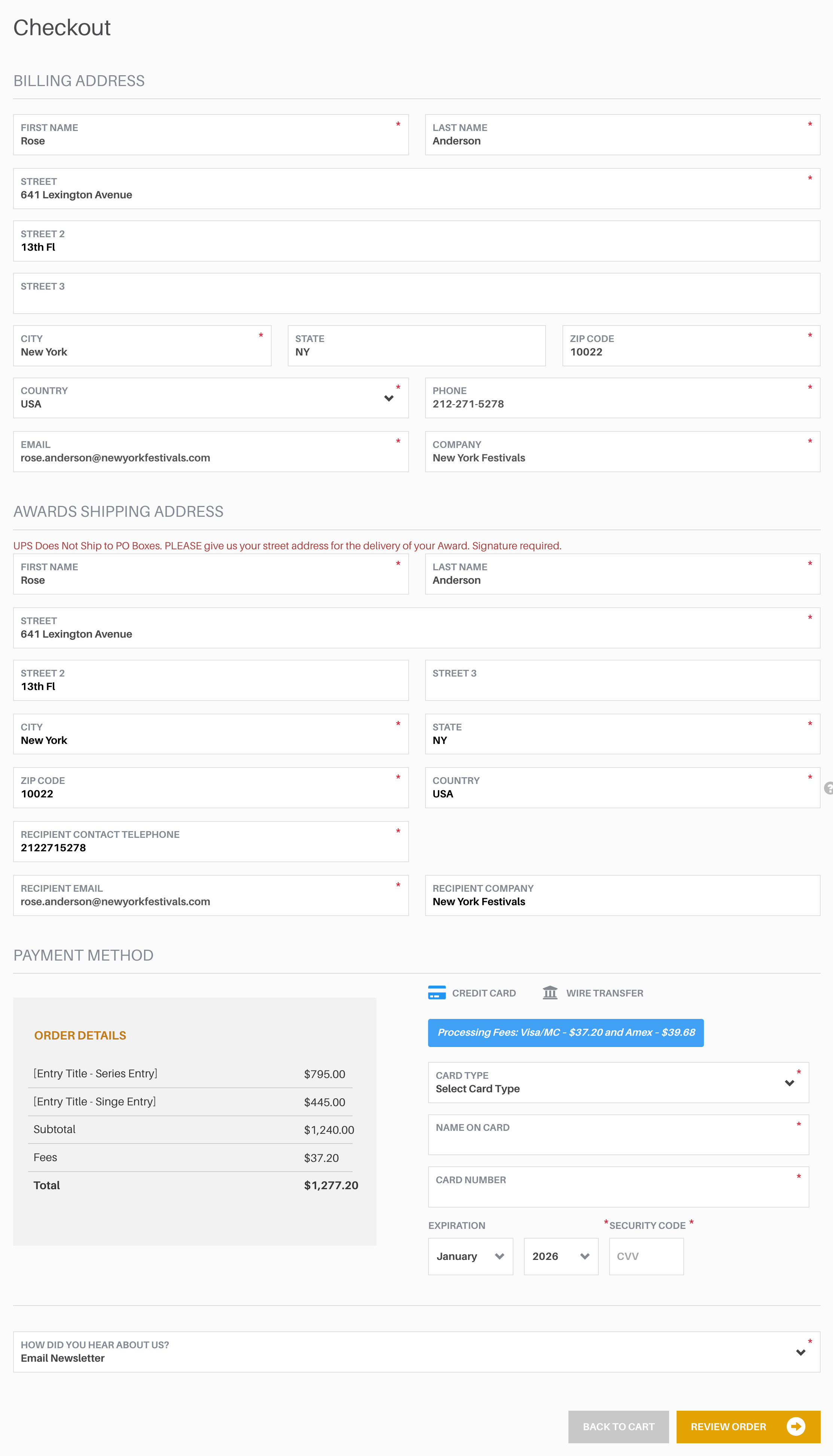
6. Checkout
PLEASE PREPARE THE FOLLOWING INFORMATION
To finalize your order and close your cart, we ask that you include your billing address and contact information along with shipping address and payment method. If you encounter any errors, please contact processing@newyorkfestivals.com
Entrants living in the following European Union countries, Northern Ireland, Norway, and Switzerland, must prepare their Economic Operator Registration and Identification number (EORI, also known as Organization Number or Unique Identification Number):Austria, Belgium, Bulgaria, Croatia, Republic of Cyprus, Czech Republic, Denmark, Estonia, Finland, France, Germany, Greece, Hungary, Ireland, Italy, Latvia, Lithuania, Luxembourg, Malta, Netherlands, Poland, Portugal, Romania, Slovakia, Slovenia, Spain and Sweden.
UPS does not ship to PO Boxes.
Please give us your street address for the delivery of your Award.
Students must use their personal address not the sponsored school address. We cannot ship to schools.
SHIPPING ADDRESS
FIRST NAME
LAST NAME
STREET 1
STREET 2
STREET 3
CITY
STATE
ZIP CODE
COUNTRY
PHONE
EMAIL
COMPANY
BILLING ADDRESS
FIRST NAME
LAST NAME
STREET 1
STREET 2
STREET 3
CITY
STATE
ZIP CODE
COUNTRY
PHONE
EMAIL
COMPANY
PAYMENT METHOD
CREDIT CARD
CARD TYPE
NAME ON CARD
CARD NUMBER
EXPIRATION DATE
WIRE TRANSFER $125 Fee
7. review & submit
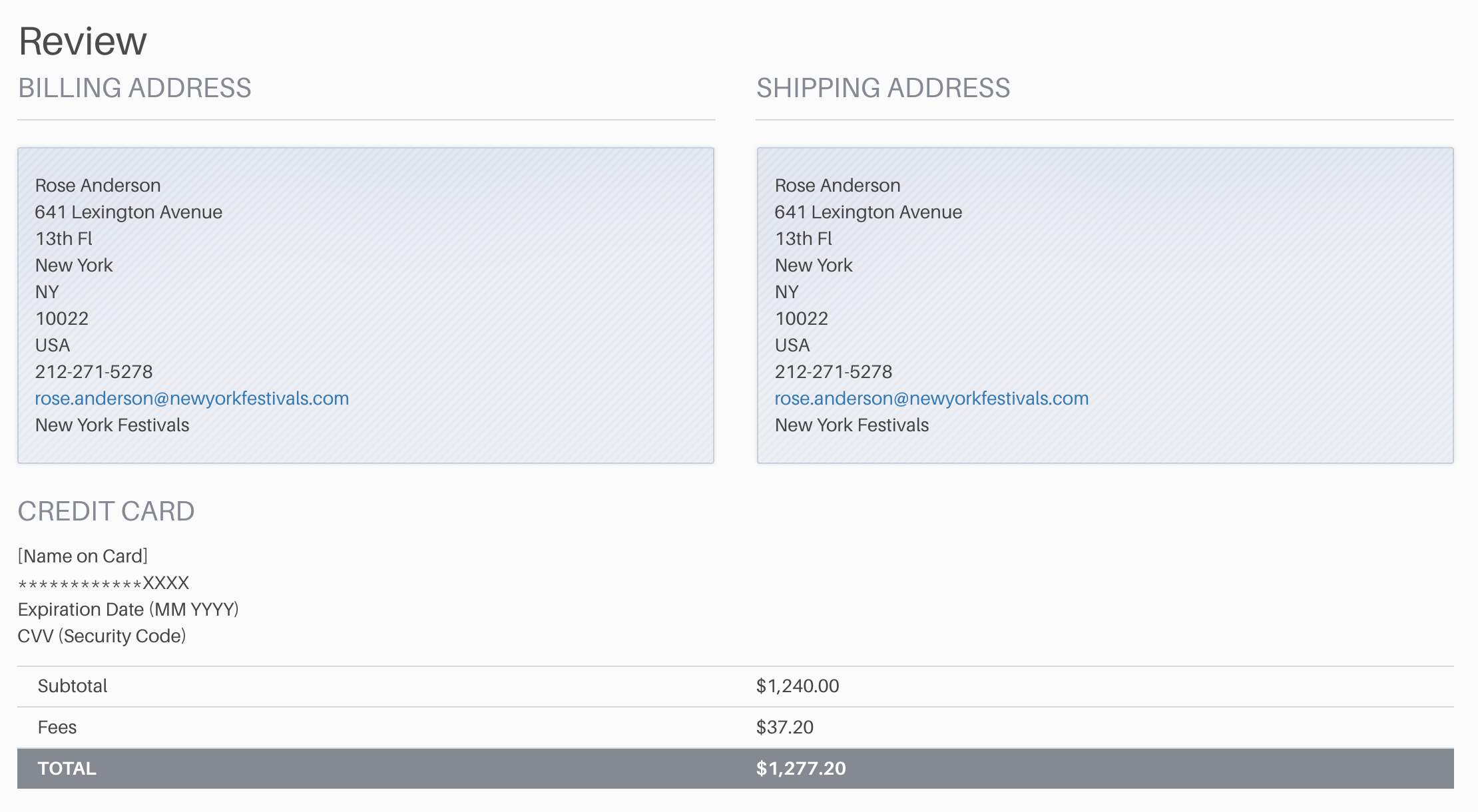
CREDIT CARD
WIRE TRANSFER
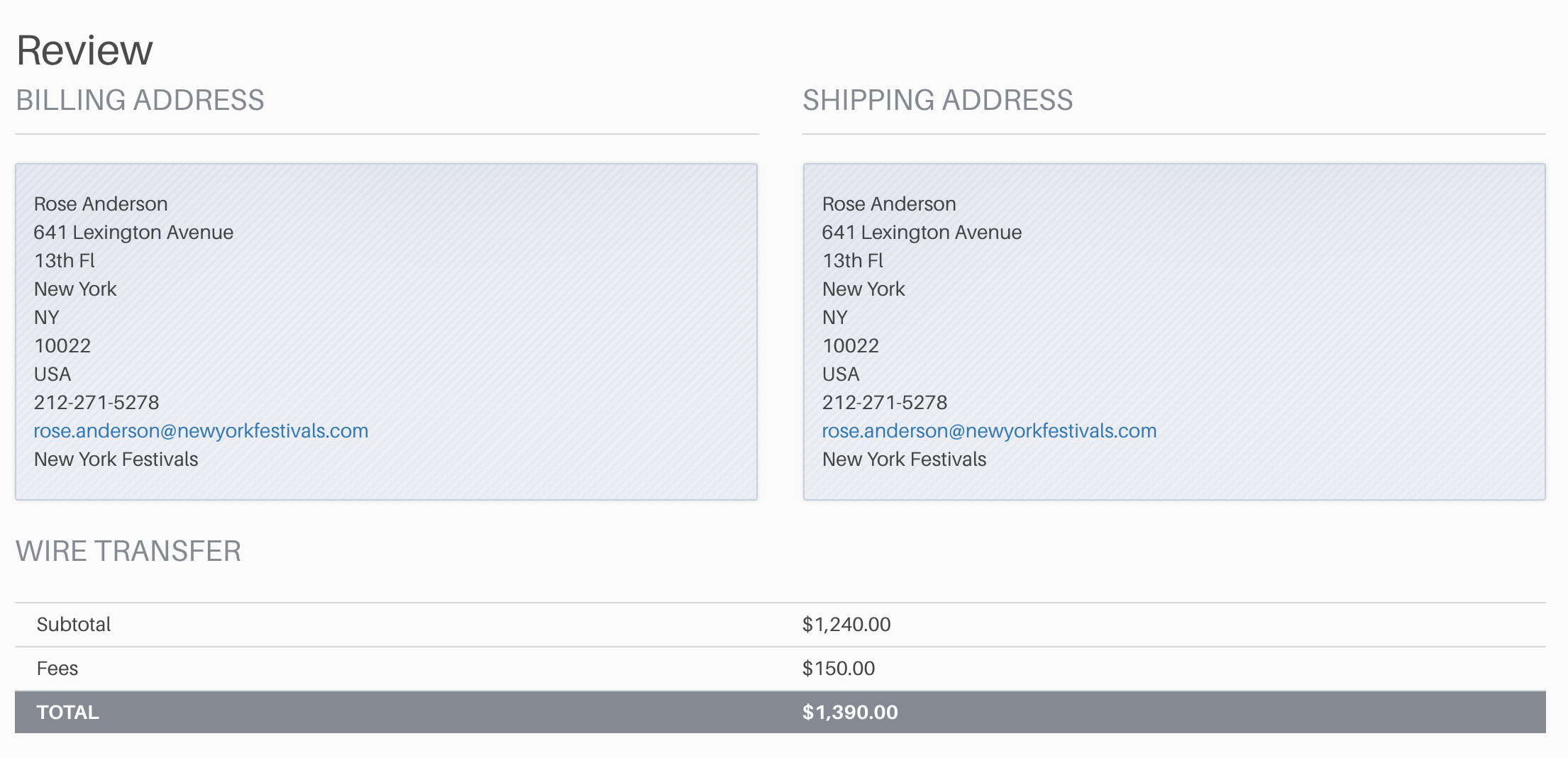
Once you have completed all of the fields in Checkout, you can give a final review of your billing and shipping addresses before you confirm and submit your order to close your cart. If you receive an error message when you submit, please make sure the billing address is the same as the billing address listed for you.
8. CONFIRMATION NUMBER
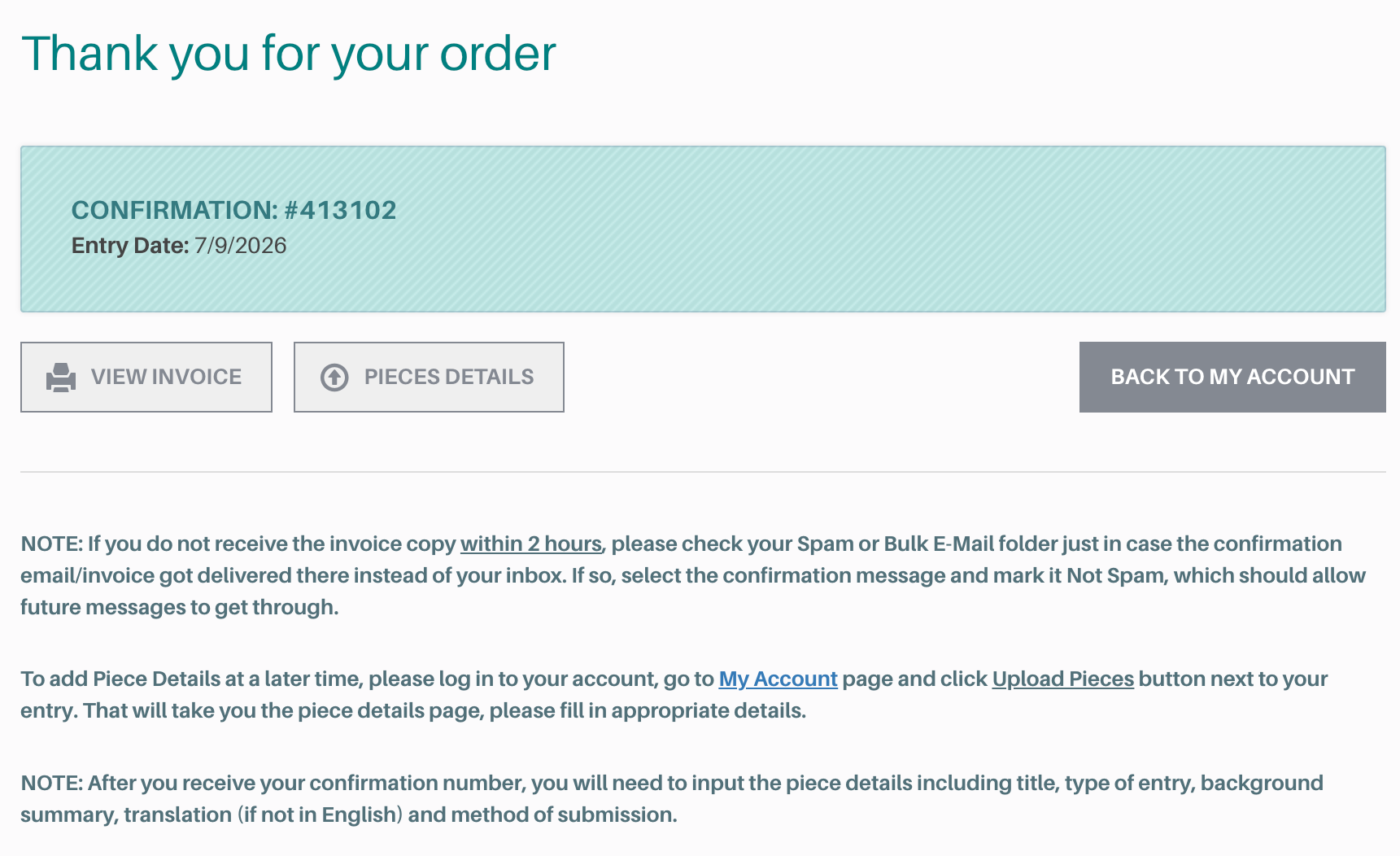
Upon confirmation, an Invoice and Order Number will be generated and e-mailed to you; please refer to this as your record.
Your orders and entries will be displayed at the bottom of your Account Dashboard.
After you receive your confirmation number, you will need to input the piece details including title, type of entry, background summary, translation (if not in English) and method of submission. You can also access the invoice for your order.
9. Piece Details & Upload
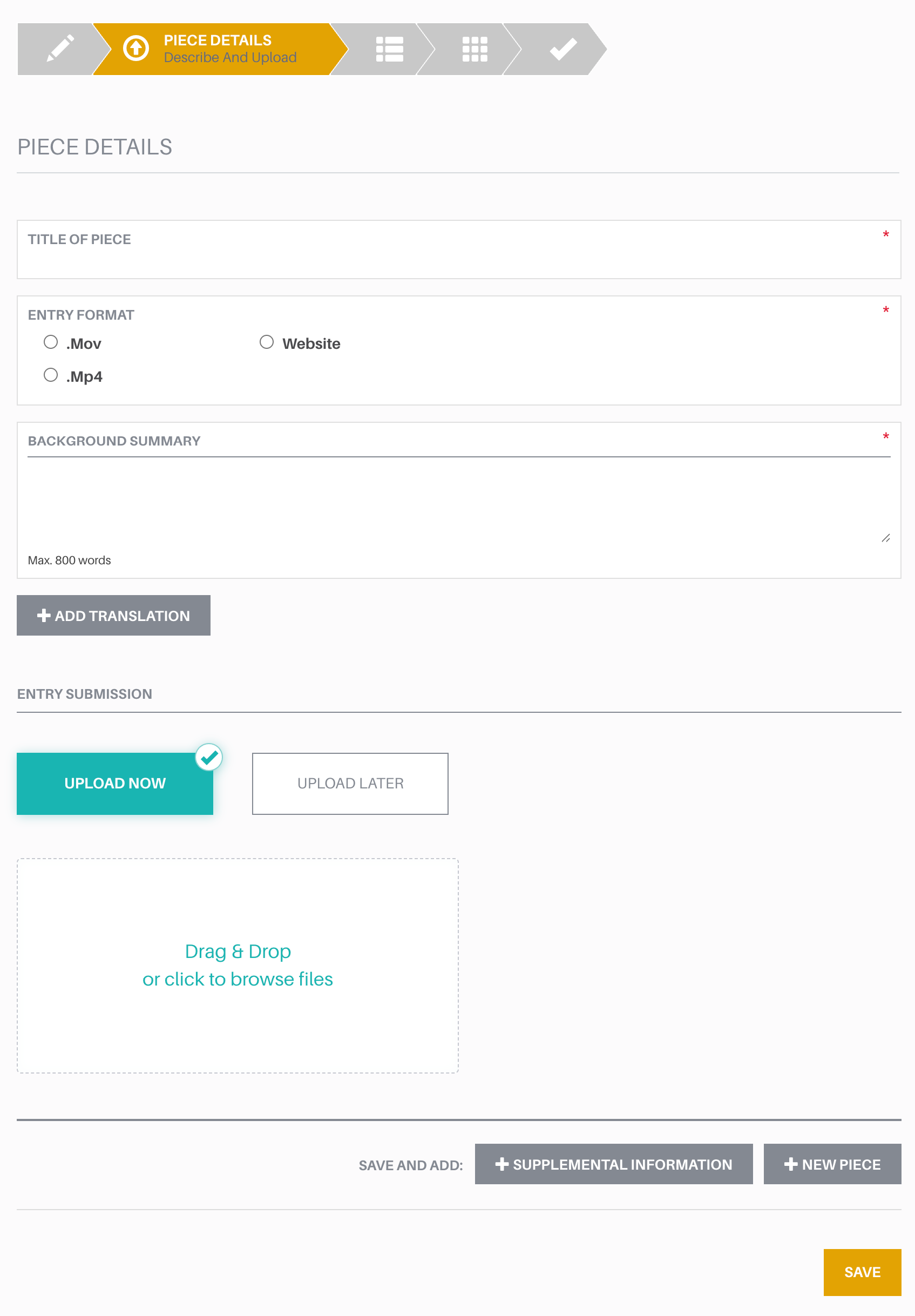
This portion of the Entry Form contains information which the Grand Jury views in the selection process. If your entry is a series, you will have multiple pieces to upload. Please be sure to click the yellow “SAVE” button to retain your entry progress.
PIECE TITLE
ENTRY FORMAT
BACKGROUND SUMMARY REQUIRED 800 Word Max.
This is your opportunity to address the grand jury members and explain what is special about your submission. Please include the purpose of your entry, the audience for your entry and any other pertinent information about content and context.
UPLOAD
Please upload your files in the order you want them viewed by the Grand Jury. You must select the entry format before uploading. Drag & Drop your file into the space provided to upload your work.
To add a new file, please click either “+NEW PIECE” or “+SUPPLEMENTAL INFORMATION” to create a new Entry Piece for you to upload to.
Remember to input your background summary and translation before you upload your file.
All submissions are reviewed/QCed before judging and if there are any issues, we will contact you.
TRANSLATION Optional, Unlimited Space
Although members of the grand jury speak many languages, we ask that if your submission was not produced in English, you include a translation either as embedded subtitles or transcribed in the entry form. The first and last ten minutes must be translated. If you think subtitling the entire submission will be beneficial, you are encouraged to do so.
student entrants
SAMPLE ENTRY FORM
base information
PLEASE PREPARE THE FOLLOWING INFORMATION
ENTRY TITLE
BRAND/NETWORK/PLATFORM
ENTERING COMPANY
LEAD CREATIVE DIRECTOR/PRODUCER
LEAD CREATIVE DIRECTOR/PRODUCER EMAIL
Please make sure that your Entry Title, Company, and Brand/Network/Platform name all contain proper spelling and correct capitalization. Winning entries will be showcased on our website exactly as they are entered.
ENTRY TYPE
See Text Specifications
See Eligibility & Entry Type for Single, Series
RELEASE/AIRDATE
Must be within Eligibility Window
SHOWCASE YES or NO
Winning entries will be shown in their entirety in our Winners Gallery. Select NO to opt out.
Assign credits
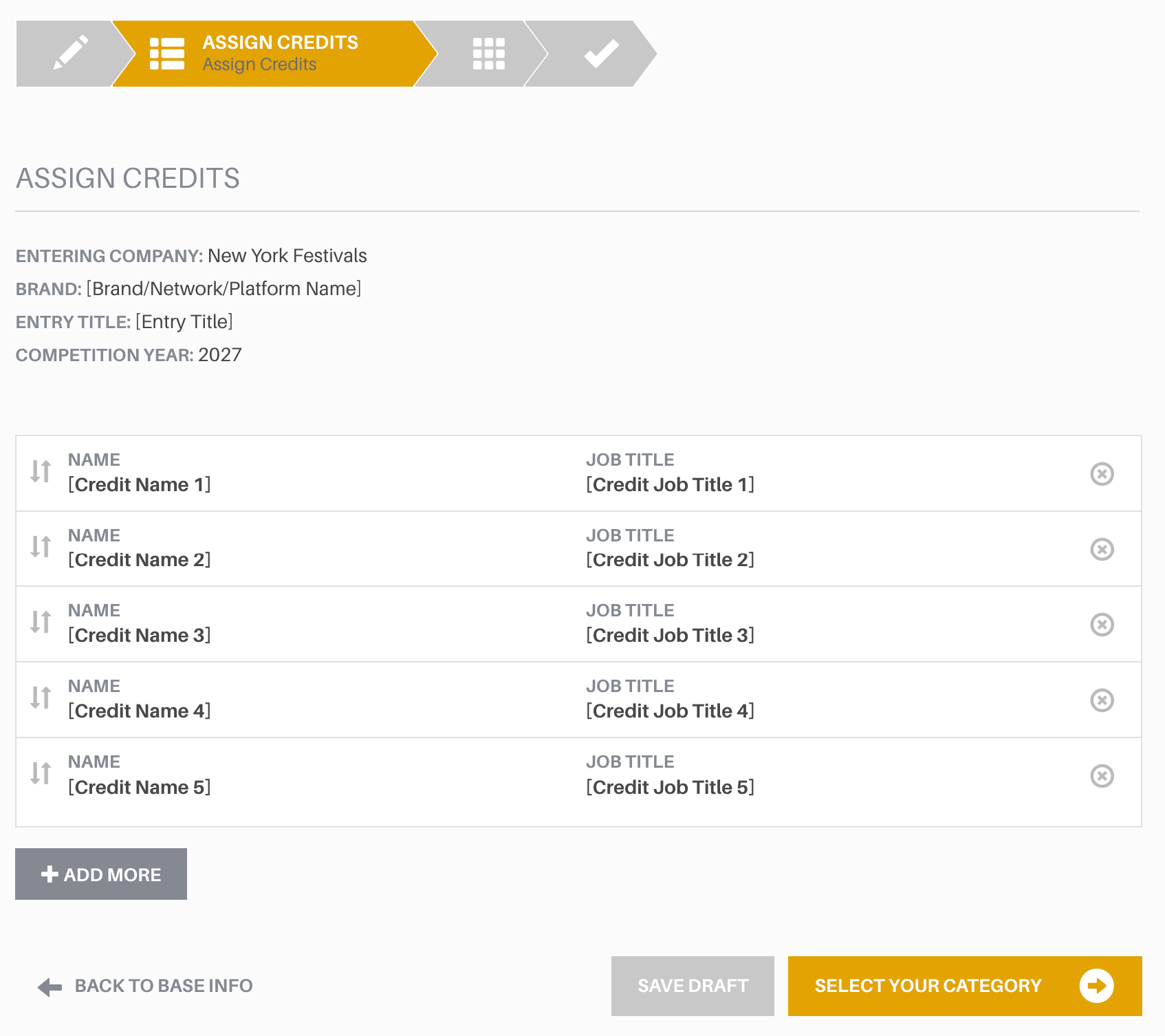
Please list individual credits in order of importance with the highest credit first. The character limit for each line of Credits is 80 characters including spaces.
Winning trophies will be shipped to the entering contact shipping address only. Any return and re-shipping costs will be paid for by the entrant.
Select Category
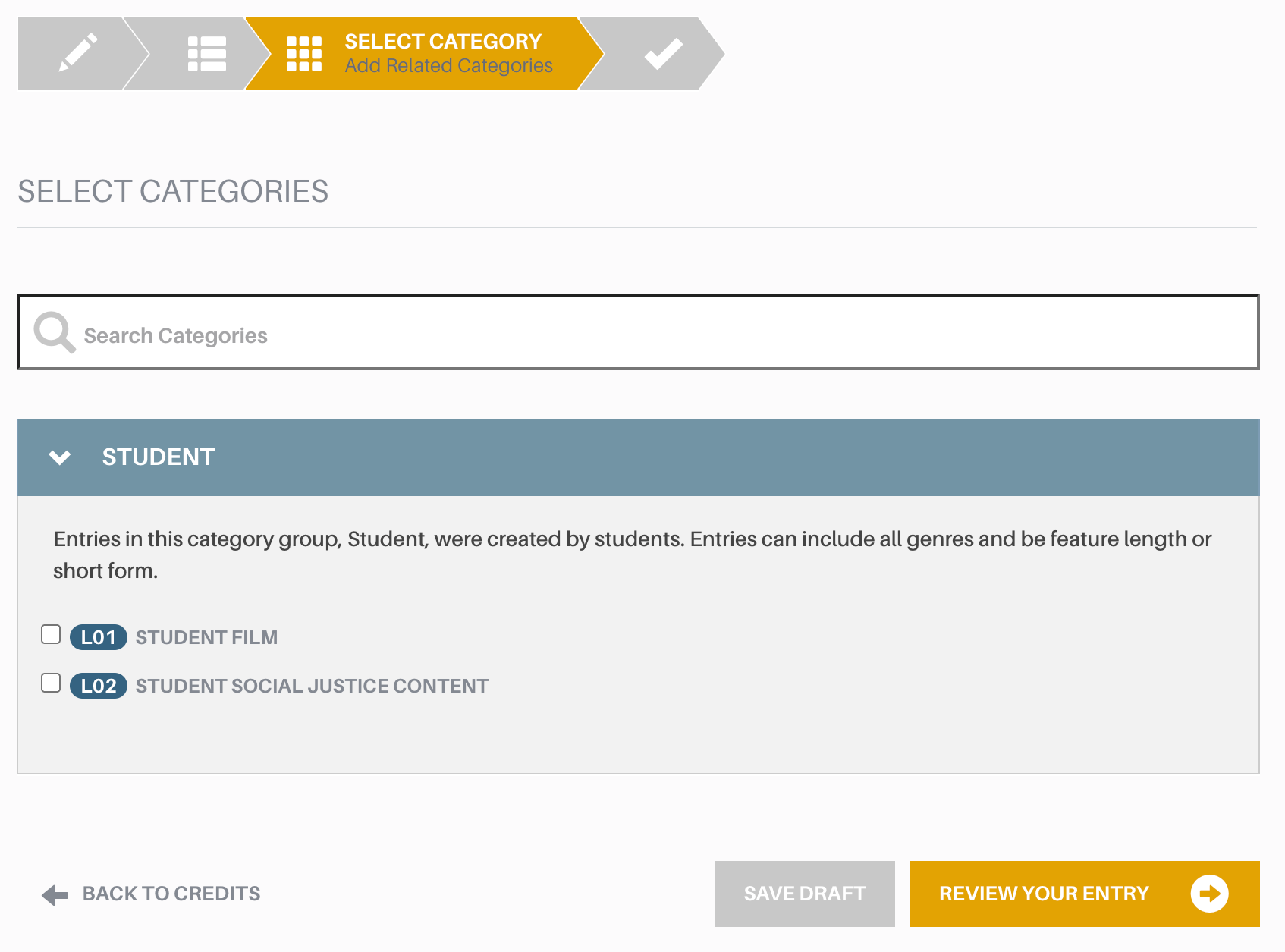
Select the category that most closely relates to your submission’s type of program, primary purpose, content, or target audience. You may enter the same production or program in multiple categories, including program categories and craft categories. If you are submitting the exact same material including credits into more than one category, our system will duplicate that entry across all the categories you select. There is an entry fee for each category you enter. Categories have Single entry and Series entry options.
If your entry is a copy, please keep only the new category you have selected. Please remove the word Copy in the entry title on the Base Information page.
4. review entry
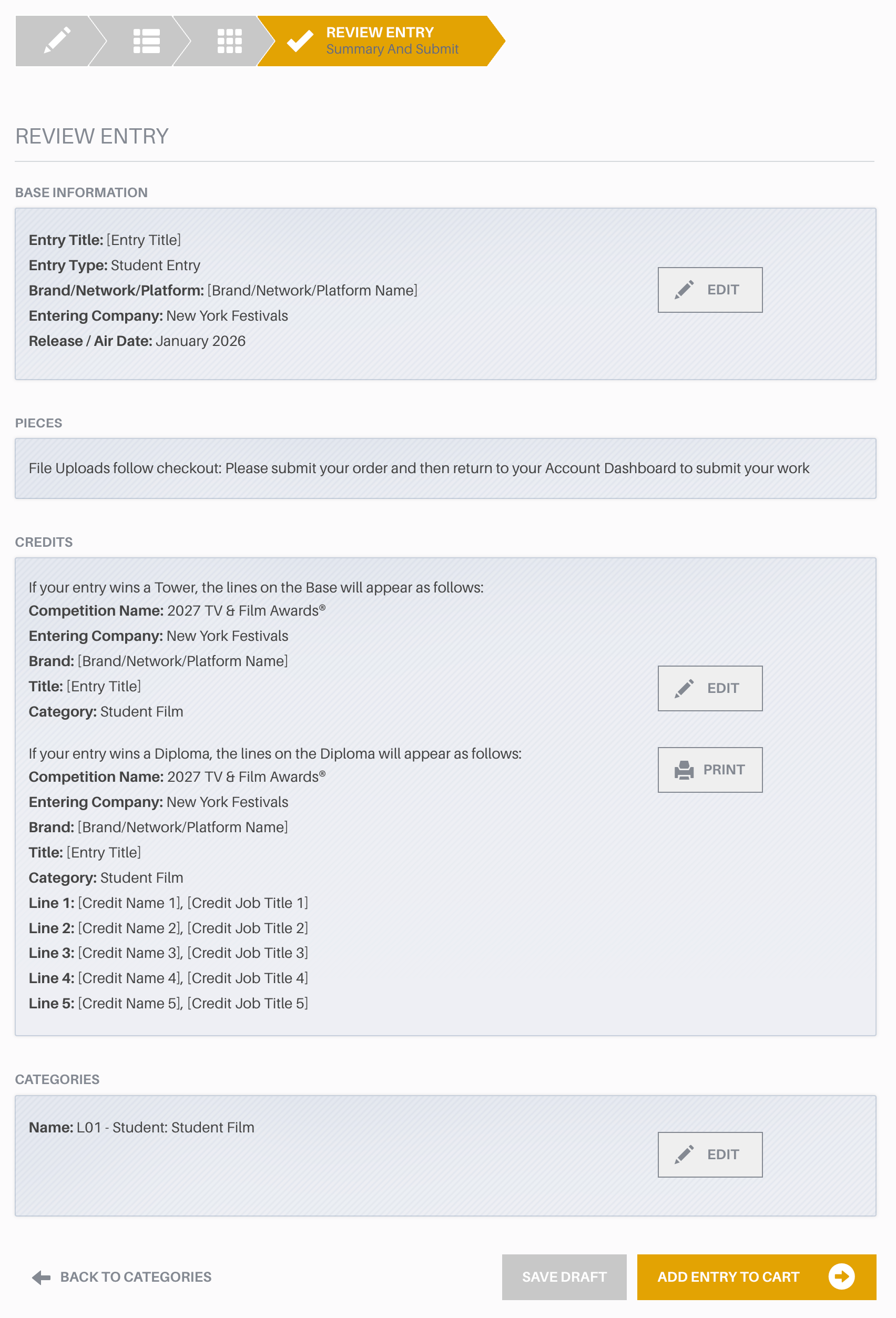
The “Review Entry” page summarizes your Base Information, Credits, and Categories. Please make sure these details are correct. When you are ready, click the “ADD ENTRY TO CART” button to continue. You can have multiple entries in any one cart if you wish.
You will be able to upload your submissions only after you close your cart and pay for your entries. After you receive your confirmation number, you will need to input the piece details including title, entry format, background summary, and translation (if not in English) before you upload each piece of each entry.